

The Ohio Secretary of State maintains a public register of every business entity authorized to operate in the state. The register is open to anyone and holds the documents a company submitted when it formed, along with later amendments, agent changes, and annual report confirmations. Lenders, landlords, vendors, and attorneys check it routinely to confirm that a counterparty exists and is in good standing before money changes hands.
What follows describes how the register is organized, what each search field accepts, which columns appear in the results, and where the limits of the public file sit. It also marks the points where a search returns less than expected, so a thin record is not mistaken for a defect in the company itself.
What the Ohio Business Register Contains
The register holds a file for every domestic entity formed under Ohio law and every foreign entity authorized to transact business here. Each file carries the registered name, the number assigned at filing, the formation date, the current status, the county named in the formation document, and the statutory agent on record. An Ohio Business Search by Name reaches any of those files, and later documents attach to the same file rather than starting a new one. Nothing is removed when a company closes.
Ohio Secretary of State, Business Services Division, 22 N. Fourth St., 16th Floor, Columbus, OH 43215:
https://businesssearch.ohiosos.gov/
Starting a Search by Business Name
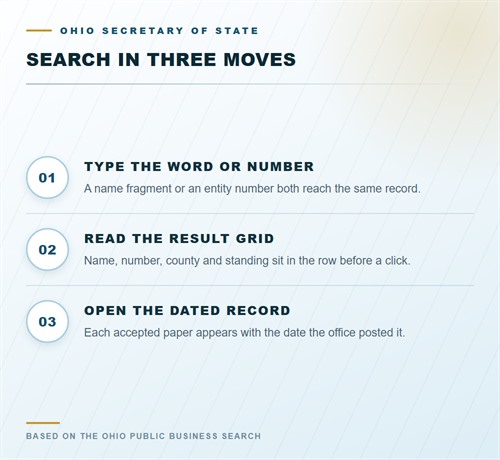
The name field accepts a registered name as filed and also works with a fragment of one. A single distinctive word returns a shorter, more usable list than a word appearing across hundreds of company names. Adding the entity suffix trims the list further. Punctuation is handled loosely, so a name entered with or without a comma generally produces the same set of matches, and capitalization rarely matters at all.
Partial Words in the Name Field
A fragment matches anywhere inside the registered name, not only at the beginning. Searching for ridge can return Ridgeway Holdings, Cedar Ridge Supply, and Northridge Dental in the same list. Results arrive ordered by relevance and then alphabetically, and each row opens directly without a return to the search form. That saves time when a name has several close variants.
Names With Numbers and Ampersands
Registered names often carry numerals or a joining word, and both are typed exactly as they appear. A company listed as Fifth Third Center or Smith & Sons will not surface from a search that drops the figure or the symbol. When the exact form is uncertain, search the distinctive word alone and read the returned name in full.
Searching by a Former Name
A company that changed its legal name keeps both names in its history, and the earlier one often remains reachable through the record itself. Someone who knows only the old name may need to search it first to reach the file, then read the amendment that introduced the current name. Older invoices and contracts frequently carry the retired version.
Searching by Entity Number
Every entity receives a number when its formation document is accepted, and that number is the surest key in the system. It appears on correspondence from the Secretary of State, on bank and title requests, and on the entity’s own filings. Entering it bypasses name ambiguity entirely and returns a single record, which is why anyone who has the number uses it before trying the name.
Where the Number Appears
The number sits at the top of the entity record, so one name search supplies it for future reference. It also shows on annual report reminders, on certificates issued by the office, and in contracts that list registration details. Recording it alongside the company’s file saves a repeat name search months later, when the exact registered spelling may have been forgotten.
When a Number Returns No Record
A number that produces nothing usually means a digit was copied incorrectly, or that the entity registered in another state. A foreign entity registers in Ohio under a new Ohio number, so a home-state number will not match. Checking the digit count and the prefix before retrying avoids repeated dead ends and wasted requests to the company itself.
Charter Numbers for Corporations
A corporation holds a charter number as well as an entity number. The two identifiers are separate fields on the same record, and either one reaches the file. Older documents sometimes carry only the charter number, which is why the portal accepts it in the same area where the entity number is entered. Neither number changes when the company amends its articles.
Both Numbers on the Record
Both appear on the corporate record and on certificates issued for the company. Later filings cite the entity number, while minute books and stock certificates from earlier decades often show the charter number alone. Keeping both in the company’s own files prevents a lookup from stalling on an old document that predates the current numbering practice.
Charter Numbers on Certificates
A certificate issued for a corporation quotes the charter number in its body. Attorneys reviewing an old closing binder may find that number on a document and nothing else. Entering it in the portal returns the current record, which is usually enough to establish that the corporation named on the certificate is the same one still on file.
Records for Long-Established Corporations
A corporation formed decades ago may show a short charter number and a longer entity number with no visible relationship between them. That is expected rather than an error. The record remains continuous even where the identifiers look unrelated, and the filing history is what ties the early documents to the present company.
Finding a Company Through Its Statutory Agent
Agent names can be searched on their own, which helps when the company name is unknown. A commercial agent service may represent hundreds of entities, so a plain agent search can return a long list. Pairing the agent name with a city or part of a business name reduces the list to something workable. The agent field is often the only thread available when a mailing arrives with a partial company name.
Agent Address Requirements
A statutory agent needs a physical Ohio location; a postal box is rejected. The agent’s signed consent reaches the division alongside the formation papers. The address on the record is where official mail goes, so an outdated entry can cause a company to miss notices that carry real deadlines.
When the Agent of Record Has Moved
An agent who relocates without updating the record leaves a stale address behind. The company is responsible for filing the update, and the charge for it sits in the table near the end of this page. A vendor mailing a notice to the old address has no way of knowing the record is out of date until the letter comes back.
Agent Services and Long Result Lists
Registered agent firms appear on thousands of records, and a search by one of those names returns page after page. Filtering by entity type or status cuts the list substantially. Opening the record for the entity that matters remains the only way to confirm which company the agent currently represents, since the agent name alone says nothing about the relationship’s age.
Columns in the Search Results
Each row shows the business name, the registration number, the entity type, the county, and the status. The filing date appears in some views. Reading a row from left to right gives a summary before the record is opened, and the columns hold steady across name, number, and agent searches, so a reader who learns the layout once can read every result set the same way.
Entity Type Values
The type column separates a limited liability company from a for-profit corporation, a nonprofit corporation, a limited partnership, a limited liability partnership, and a foreign registration. Type matters because filing obligations differ. A nonprofit corporation files the same annual report as a for-profit one but answers to separate rules at the federal level and with other state agencies.
Reading the County Column
County reflects what the formation document declared, usually where the principal office sat at the time. It is not updated when a company moves and does not list every county where business happens. The field is a filing detail rather than a statement about operations, and a company with statewide sales will still show one county.
The Name Column and Its Ordering
Names appear in the register exactly as the office recorded them, including capitalization and suffixes. A list sorted alphabetically places a name beginning with The under T rather than under the word that follows it. Scrolling past the first screen of results often turns up a match that a stricter sort would have pushed off the page.
The Filing Date Column
The date shown is the one the office assigned when the document took effect, not necessarily the day it arrived by mail. A filing received near the end of a month can therefore carry a later date than the sender expects. For older entities the date marks the original formation rather than the most recent document on file.
Filtering and Sorting the List
Filters narrow the result set by entity type or by status. On a name search that returns a mix of open and closed companies, removing inactive entries is usually the fastest route to the one still trading under that name. Sorting by name or by number changes the order without changing the contents of the list.
Combining Filters
One filter at a time produces a broad list; two together produce a short one. Selecting limited liability company and active status, for instance, removes partnerships and closed companies in a single pass. Filters reset when a new search runs, so they must be reapplied to each query rather than carried over from the previous one.
Working With Long Lists
A frequent surname or a single word such as Ohio can return hundreds of rows. Narrowing by county, type, or the first few letters of the name takes less effort than paging through the whole set. The portal is built for targeted lookups rather than bulk research, so several narrow searches usually beat one broad one.
Opening an Individual Entity Record
Selecting a row opens the full record. It lists the current agent, the principal office address, the effective date, and the history of documents filed. The page also displays the numbers assigned to the entity and the county declared at formation, along with the registered name exactly as the office recorded it on the most recent accepted document.
The Filing History Panel
The history shows document types and dates rather than the documents themselves. A reader can see that an amendment was accepted in a given year without seeing what it altered. Copies of the underlying Ohio business filings are ordered separately, and their charges appear in the table below.
Copying Details From a Record
A record can be read on screen and transcribed into a file, though the page carries no seal and proves nothing to a third party. Names and numbers copied by hand are easy to transpose. A certificate or a certified copy is the version that a bank or a title company will accept as evidence.
The Principal Office Address
The principal office is the address the company reported for its main place of business. It may differ from the agent’s address and from any location where customers are served. A company that has moved without amending its filings will still show the older address on this line, sometimes for years after the move.
Status Words and What They Mean
Four words appear in the status field. Active means the entity is current with its obligations. Held means a filing was accepted but the entity is not in good standing, often because an annual report is outstanding. Canceled marks a registration ended voluntarily, and Dissolved marks an entity wound up under Ohio law. The status applies to the entity, not to a trade name filed under it.
What Held Status Indicates
A Held entity still exists but sits outside good standing. Lenders and title companies often decline to close while a record shows that word. Clearing it normally means filing the missing report or document and waiting for the office to process the submission, which can take longer than the deadline the third party has set.
Canceled and Dissolved Records
A canceled registration and a dissolved entity both remain in the register permanently. The difference lies in how the end came about, and the filing history usually shows which document closed the company. Neither status bars a later registration of a new entity under a similar name, subject to the usual conflict check.
Status and the Annual Report
Both an LLC and a corporation must submit a report by April 1; no fee is attached. Skipping it does not end the company, but the omission shows up in the status field and follows the record until corrected. A status that flips from Active to Held usually traces back to that date and that missing report.
Information the Public Record Does Not Include
The record is a registration file, not a business profile. Owner rosters stay off the public page, and equity shares and managers not named in a filing remain private. What remains is the agent, the addresses, the status, and the document history. The index also shows whether a filing is current, which matters when a contract depends on the standing of the entity today rather than last year. Anyone expecting financial detail will not find it here.
Ownership and Financial Detail
An LLC record does not name its members. A corporation record does not list shareholders. Where a manager or officer is named, the reference comes from a specific filing rather than from a standing disclosure. Requests for ownership information go to the company, not to the office, and the company is free to decline them.
Records for Foreign Entities
A company formed in another state appears under its own Ohio number, and the file names the home state without carrying that state’s history. The Ohio registration date is not the date the business was created. A reader who needs the earlier record has to ask the state of formation, since the Ohio file starts at registration and goes no further back.
What a Registration Does Not Prove
Existence and standing are the two facts the register supports. It says nothing about licenses held, taxes paid, insurance carried, or assets owned. A company can be Active and still be barred from a regulated trade, which is why a license lookup belongs beside the record check rather than instead of it.
Fees for Copies, Certificates, and Handling
Searching costs nothing. Charges apply to documents ordered from the office, to certified copies, and to optional handling that shortens processing. The amounts below are set by the Secretary of State and are collected when the request is submitted, before the office begins work on the document.
| Item | Amount |
|---|---|
| Public search | $0 |
| Agent update | $25 |
| Standing certificate | $5 |
| Preclearance | $50 |
| Certified copy | $5 |
| Two-day handling | $100 |
Frequently Asked Questions
These answers address the points that come up when someone is reading an Ohio entity record for the first time and is unsure what the fields do and do not represent.
Is there a charge to search the Ohio business register?
No. Name searches, number searches, and agent searches through the Secretary of State portal are free and require no account. Charges begin only when a user orders copies, certificates, or expedited handling of a document.
Can I search using only part of a business name?
Yes. A partial name returns every record containing the entered text, which helps when the exact registered form is unknown. A distinctive word produces a shorter list than a generic one, and a type filter tightens it further.
Why does a record show no members or owners?
Ownership details remain private. The open page lists the agent, the mailing addresses, the standing, and the history of accepted documents, while equity and member information stays with the company.
What separates an entity number from a charter number?
A corporation holds both. The entity number is assigned to every registered business, while the charter number applies specifically to corporations. Either identifier reaches the same record when entered in the portal’s search field.
Does the county field show where the business operates?
Not reliably. The county reflects what the formation filing declared and is not updated when a company relocates or expands. Read it as a filing detail rather than a statement of physical operations.
How current is the information in the register?
Records update as filings are processed, so a document submitted recently may not appear for several business days. Expedited handling shortens that interval. Status changes follow the same schedule as the filing behind them.
Using Results With Care
A record confirms registration and current status, nothing more. It does not verify that a company holds a license for its trade, pays its taxes, or owns the assets it claims. Cross-checking against a license lookup, a court index, or a credit report gives a fuller picture, and a request for a certificate of good standing produces a dated statement that a third party can rely on when the search itself is not enough.